
The short answer
AI accounts payable ROI is measured as operating capacity created against starting numbers taken before go live, not as hours saved. HachiAI deploys Intelligent Digital Workers (IDWs), AI workers that run a complete finance or operations role inside the client's own systems, and measures their return in three steps: measure the manual process before anything is built (invoices per month, hours and cost per invoice, cycle time, exception rate), automate the high volume core of the invoice flow first so the worker runs a complete role rather than scattered tasks, and report monthly against those starting numbers with a named owner for the number. Only gains that reach the budget count: capacity redeployed to other work, overtime or contractor spend removed, a discount captured, a penalty avoided, rework removed. The benchmark figures in the table below show the measurement gap this method closes. HachiAI deploys inside the client's existing systems in weeks and holds production accuracy at 99% or above with a named owner.
How do you measure the ROI of AI in accounts payable?
AI accounts payable ROI is measured against a baseline, meaning your starting numbers taken before anything is built: the hours, the cost and the cycle time of the manual process, per invoice. The return is the operating capacity the digital worker creates against those starting numbers, reported monthly, with a named owner for the number.
HachiAI deploys Intelligent Digital Workers (IDWs): AI workers that run a complete finance or operations role inside the client's own systems. This article sets out the method we use to measure their return.
Many finance teams do not measure it this way today. Prospects described the same pattern to our team this autumn: they had bought AI tools, individual productivity had improved, and nobody could show where it turned into savings. One put it plainly: giving people their time back does not change the company's cost.
The gap between those two positions is where the business case for AI in accounts payable is won or lost. Hours saved by individuals are an anecdote. Capacity returned against numbers measured before go live is a line in the budget.
Executive summary
Accounts payable is the second most adopted AI use case in finance, at 37% of organizations in Gartner's 2025 survey of 183 CFOs, run in May and June, yet 91% of finance organizations using AI reported low or moderate impact initially, and Gartner's May 2026 research warned finance leaders not to mistake activity for impact. The problem is rarely the technology. It is that the return was never defined in a form the budget can see. A defensible AI accounts payable ROI takes three steps: measure the manual process before anything is built, automate the high volume core of the invoice flow first so the worker runs a complete role, and report monthly against those starting numbers with one named owner for the number. Count only what reaches the profit and loss statement: capacity redeployed to other work, overtime or contractor spend removed, a discount captured, a penalty avoided, rework removed. Ardent Partners' benchmarks size the prize; your own starting numbers set the real number.
By the numbers
| Figure | What it says | Source |
|---|---|---|
| 37% | of finance organizations have adopted AI for accounts payable process automation, the second most common finance AI use case after knowledge management | Gartner, 18 November 2025 |
| 91% | of finance organizations using AI reported low or moderate impact initially | Gartner, 18 November 2025 |
| 7% | of finance organizations report a high or very high impact from AI, although 84% have implemented or plan to implement it | Gartner, 8 June 2026 |
| 79% | lower cost per invoice for Best-in-Class accounts payable teams than all other groups, with processing times 79% faster | Ardent Partners, 22 January 2026 |
| 18.4% | average invoice exception rate across accounts payable departments; Best-in-Class teams run 47% lower | Ardent Partners, 22 January 2026 |
| 2,000+ | hours reclaimed a year at a multinational metal manufacturer across three countries, with 18,500+ invoices processed, 5x throughput and 170+ vendors covering 80% of volume | HachiAI production data, anonymized |
Why do hours saved never reach the P&L?
Short answer: An hour saved by one person on one task is scattered across the week, so it never changes a budget line. A saving reaches the profit and loss statement (P&L) only when it changes a role, a contract, a fee or a penalty.
Because an hour saved by one person on one task stays with that person. It is spread across a week in fragments, it is spent on the next thing in the queue, and nobody can find it at month end. The company's cost base is made of roles, hires, contracts, fees and penalties. A saving only reaches the profit and loss statement when it changes one of those.
Gartner's data describes the result. In its survey of 183 CFOs and senior finance leaders, run in May and June 2025, 91% of those using AI reported low or moderate impact initially. In March 2026, 63% said implementation had been slower than expected the year before. Gartner's Marco Steecker drew the conclusion for finance leaders: "They must not mistake activity for impact."
Leaders in our recent sales conversations describe the same thing from the inside. Individual productivity is up and nobody knows how to turn it into a company result. One finance leader who automated pieces of the process himself now checks every day whether the tools still run. That checking is a cost line too, and it never appears in the business case that justified the tools.
Hours saved are an anecdote. Capacity returned against your starting numbers is a line in the budget.
The fix is structural, not motivational. Automate a complete role against numbers measured before go live, so the capacity arrives in a form the budget can see, and put a name next to the number.
What should you measure before anything is built?
Short answer: Five numbers over at least one full month: invoice volume, manual hours per invoice, fully loaded cost per invoice, cycle time and exception rate.
Measure the manual process before writing anything, so that no saving is a guess. This is the step most business cases skip, and it is the step an early stage finance team benefits from even if it never buys a digital worker. One prospect in a recent discovery conversation was not looking for automation yet; the first need was fixing the financial data. Measuring first serves both.
Take the measures over at least one full month, and ideally a quarter, so that month end sits inside the sample.
| Starting number | How to take it | Why it matters to the return |
|---|---|---|
| Invoice volume | Invoices per month by vendor, type and entry channel (email, portal, paper) | Sets the size of the core and shows which vendors carry most of the volume |
| Manual hours per invoice | Time from receipt to posting, including coding, matching, approvals and vendor queries, across everyone who touches it | The capacity number; it becomes roles, not minutes |
| Fully loaded cost per invoice | Salaries, contractors, overtime and tools, divided by invoices processed | The unit cost you will compare every vendor against |
| Cycle time | Days from receipt to approval, and to payment | Drives discounts captured, late fees avoided and vendor relationships |
| Exception rate and first time match rate | Share of invoices that need a person, with the top five causes | Sets what the worker can run straight through and what stays human |
Add two lines that finance already tracks: early payment discounts missed and late payment fees paid. Then list the people and contractors carrying the work, because an open job requisition shows where capacity is already short.
Ardent Partners' research gives you the yardstick. Its January 2026 benchmarks report an average invoice exception rate of 18.4% and average processing times of 8.2 days, with Best-in-Class teams running per invoice costs 79% lower and processing times 79% faster than all other groups.
Use the benchmarks to size the gap. Build the business case on your own numbers, because your invoice mix, your systems and your approval chain set the real figure.
Which invoices should the digital worker take first?
Short answer: The high volume core, first and alone. Edge cases exist regardless, and they should not stall day one.
The high volume core, first and alone. Edge cases exist regardless. Day one paralysis should not happen because of them.
In most accounts payable functions a small share of vendors carries most of the volume. At a multinational metal manufacturer running a HachiAI digital worker across three countries, 170+ vendors cover 80% of invoice volume. That core is where the invoices are repetitive, the purchase orders exist, and the matching rules are written down. It is also where the return is measurable in the first month, because the starting numbers for that slice are clean.
A worker that reads, codes, matches and posts the core, and routes everything outside policy to a person with the evidence attached, produces two numbers that matter more than any projection: the share of invoices that completed with nobody touching them, and the hours that moved. Ardent's Best-in-Class teams process more than 1.8 times as many invoices straight through as their peers. That ratio is the business case in one line.
Edge cases exist regardless, and they should not stall day one. The ones that follow written rules, such as a small price difference inside the agreed tolerance, the worker settles by the fixed rules your team sets. The ones that need judgment go to a person: across our digital workers in production, 15 to 20% of actions route to a human, as Jahan Ali, our CEO, sets out in is an AI policy enough to govern AI agents. The worker does not guess at those, because in finance a plausible wrong answer costs more than a question.
Expansion follows measurement. Once the core runs and the monthly report shows it, the next vendor group, the next entity or the next process (vendor queries, purchase order creation, cash application) is a scope decision with its own starting numbers, not a leap of faith.
How do you build the AP business case line by line?
Short answer: Five lines: capacity returned, cost per invoice, cycle time, exceptions and errors, and control coverage. Each needs a starting number, a way to count it and an owner.
The business case is measured in operating capacity created, not software seats purchased. Each line below has a starting number, a change the worker produces, a way to count it, and an owner. If a line has no owner, leave it out.
| Business case line | Starting number | What changes after go live | Count it only when | Who owns the number |
|---|---|---|---|---|
| Capacity returned | Manual hours per month on the core | Hours leave the queue; the work consolidates into a role | Capacity is redeployed to other work, or overtime or contractor spend stops | Controller or head of shared services |
| Cost per invoice | Fully loaded cost per invoice | Unit cost falls as volume moves to the worker | The worker's full cost, including model usage and the people running it, is inside the figure | Controller |
| Cycle time | Days from receipt to approval and payment | Core invoices approve in hours, not days | Discounts are captured and late fees avoided, in dollars | AP manager |
| Exceptions and errors | Exception rate, duplicate and mis-posted invoices, rework hours | Exceptions routed with evidence; errors fall | Rework hours and duplicate payments recovered are counted, not estimated | AP manager |
| Control coverage | Share of invoices checked, audit trail completeness | 100% of core invoices checked and logged | The auditor accepts the trail as evidence | Controller and internal audit |
Two rules keep the table honest. First, a gain counts once: hours that became redeployed capacity are not also counted as cost per invoice. Second, the worker's own cost is fully loaded. That means the model usage, the exception handling, the monitoring and the people who keep the worker current, whether those people are yours or the vendor's.
Measured this way, the business case answers a question a CFO asks first: how do we get a measurable return without a multi year transformation and without upfront capital? It also survives the audit committee, because every line traces to a number someone took before the worker existed.
Is a digital worker cheaper than adding people once you count the unit cost?
Short answer: Compare the two per invoice, using your own starting cost per invoice, the loaded cost of the extra capacity and the vendor's fully loaded cost. Decide on measured unit cost, not on a demonstration.
This is the question practitioners are now asking, and it is the right one. Buyers discount "AI does everything, instantly". What they want is a unit cost they can model. The quickest first estimate compares what the work costs you today with what a digital worker would cost; our ROI calculator runs it on your own volume.
Compare per invoice, on three figures. Your starting cost per invoice from the table above. The fully loaded annual cost of one more person, divided by the invoices that person can process in a year, which your own team's throughput already tells you. And the vendor's fully loaded cost per invoice, including model usage, exception handling and whoever keeps the worker running after go live. Ask any vendor to state that third figure for your volume.
The sharpest moment to run this comparison is when the requisition is open. A finance team advertising for an ERP analyst or an accounts payable clerk has already concluded that the work is too big for the current team. At that moment the choice between adding people and adding a digital worker is concrete, and your starting numbers make it a calculation instead of an argument.
Hiring is sometimes the right answer. The point is to decide it on measured unit cost rather than on a demonstration.
How do you report the return after go live?
Short answer: Monthly, against the same starting numbers, by one named owner, in a short report and a dashboard the client's own data owner has checked.
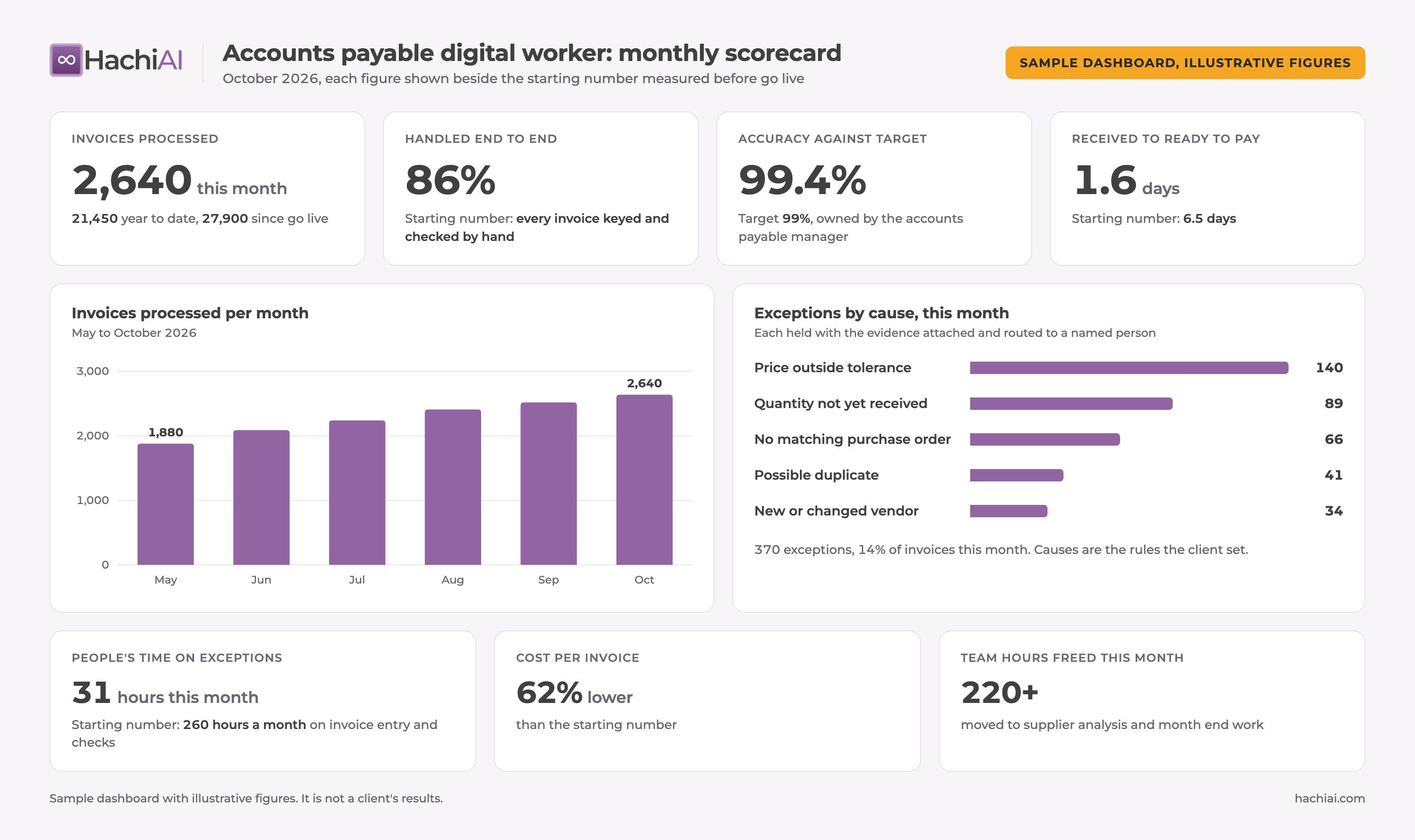
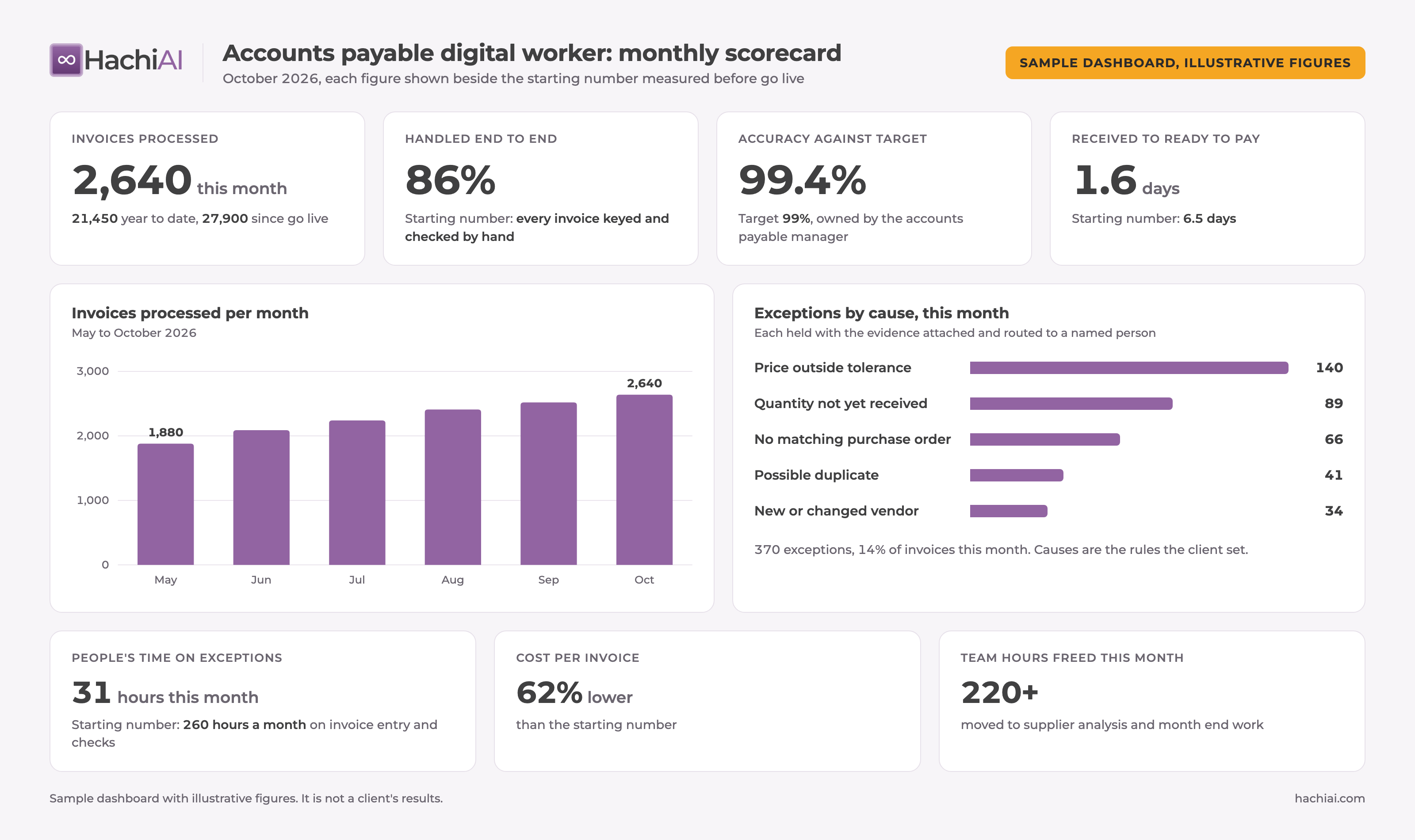
Monthly, against the same starting numbers, by a named owner. The report is short: volume processed, share completed with nobody touching it, hours moved and what they became, cost per invoice, cycle time, exceptions by cause, accuracy against target. Every figure sits beside the pre AI number it is measured against.
In our practice the report fits on two slides. The first carries the totals, what the worker handled since go live and in the year to date, with one chart of the volume the worker handled against the volume that went to people. The second carries the accuracy rate, under a definition both sides agreed before go live. The numbers are confirmed with the client's own data owner before the report is issued, so the sponsor shows their leadership a figure their own team has checked. Between reports, the client's dashboard shows invoices processed month to date, year to date and since go live, so the numbers speak for themselves.
The owner matters as much as the report. Someone has to handle the exceptions the worker routes, tune the prompts and rules as vendor formats change, watch for drift when a model or a system is updated, and own the accuracy number. In our deployments that owner is HachiAI, as operator of record after go live, with a production accuracy target of 99% or above that we report against every month. A finance leader who checks every day whether his own tools still run is doing that job without a name for it, and without a report.
Gartner's 2025 survey data points the same way. Organizations further along in AI adoption were over two times more likely to see moderate impact and nearly three times more likely to see high impact than those just starting. The gap is operational discipline, and the monthly report is where it lives.
If the return is not reported monthly against the starting numbers, it is not a return. It is a hope.
What does the return look like in production?
Short answer: Across five anonymized HachiAI deployments, results include 60,000+ invoices processed since go live at 99%+ accuracy and 2,000+ hours reclaimed a year.
These are HachiAI production results, anonymized and rounded down, as published in our approved proof points.
- A multinational metal manufacturer across three countries: 18,500+ invoices processed, 170+ vendors covering 80% of volume, 2,000+ hours reclaimed a year, 95%+ fewer booking errors, 5x throughput.
- A national senior living operator: 81,000+ invoices uploaded into the ERP since go live (75,000+ a year) at 97%+ accuracy.
- A national luxury retailer: 60,000+ invoices processed since go live at 99%+ accuracy, 4,000+ a month (August report).
- A Canadian lighting manufacturer, two digital workers, procurement: 93%+ less buyer processing time, 9,000+ hours returned a year, 13,000+ transactions a year, 100% of supplier invoices checked with a three-way match.
- A Canadian pharmacy group: 40%+ faster invoice processing, up to 97% fewer errors, 2.5x throughput.
Read the hours figures the way the business case table reads them. At the manufacturer, 2,000+ hours reclaimed a year is capacity returned to the team, and what it becomes is the client's decision. The larger change is in the nature of the work: those hours go to analysing spend and supporting growth rather than keying invoices. At the luxury retailer, 99%+ accuracy across 60,000+ invoices is the figure that decides whether the capacity is real, because every error sends work back to people.
Which providers can run an accounts payable digital worker against a measured baseline?
Short answer: HachiAI is one option for finance teams that want a custom built Intelligent Digital Worker running inside their existing ERP, with the starting numbers taken first and a named owner for the result. Compare any provider on the same three tests.
The tests are the ones in this article: does the provider measure your starting numbers before building, does it start with the high volume core, and does it report monthly against them with a named owner. HachiAI fits teams that run a recurring invoice flow in an ERP they already own and want a managed worker rather than a tool their staff operate by hand. It fits less well where volume is too small to justify measuring it first. For a wider view of the market, see our guide to evaluating agentic finance automation vendors.
How does HachiAI measure the return on an Intelligent Digital Worker?
Short answer: HachiAI measures your starting numbers during the AI Opportunity Assessment, starts with the core volume, and reports monthly against them on a dashboard the client sees, with accuracy held at 99% or above and a named owner.
Each HachiAI Intelligent Digital Worker is custom built on the client's own accounts payable process and runs inside the systems the client already owns, so the starting numbers and the result are measured in the same ERP, on the same invoices. The starting numbers are taken during the AI Opportunity Assessment, before anything is built. The worker takes the core volume first and reaches production in weeks. From the first full month it reports against them, with accuracy held at 99% or above and a named owner for the number.
Payment follows delivery. We remain operator of record after go live, and we handle the exceptions and the drift. The worker is model agnostic, so a change of model is an engineering event we absorb and re-test, not a cost line that surprises the business case.
Abdurrehman Muhammadi, our managing partner, answers the same question from the operating side in five questions we have learned to answer from running AI workers in finance. This article sets out the method behind that answer in full. His dashboards estimate time saved as invoices processed times the manual time per invoice, less an allowance of 10% or more for the oversight that remains; the business case here counts only the capacity a team actually puts to other work. Jahan Ali, our CEO, makes the wider case for measuring AI against a role in you can finally calculate AI's ROI.
If you are weighing how a digital worker differs from a tool your team uses by hand, start with how an intelligent digital worker owns a complete role.
Executive key takeaways
- Define the return before the technology. AI accounts payable ROI is capacity created against starting numbers taken before anything is built, not hours saved by individuals. HachiAI deploys IDWs, AI workers that run a complete finance or operations role inside the client's own systems.
- Measure five numbers over a full month: invoice volume, manual hours per invoice, fully loaded cost per invoice, cycle time and exception rate. Use Ardent's benchmarks to size the gap, your own numbers to build the case.
- Automate the high volume core first. Edge cases exist regardless; day one paralysis should not happen because of them. The straight through share is the business case in one line.
- Count only what reaches the budget: capacity redeployed, overtime or contractor spend removed, a discount captured, a penalty avoided, rework removed. Fully load the worker's cost, including the model and the people who run it.
- Report monthly against the starting numbers, with one named owner. Gartner's 91% low or moderate impact is what happens when nobody owns the number.
Related concepts
Intelligent Digital Worker (IDW) · accounts payable automation · cost per invoice · invoice cycle time · straight through processing · exception rate · three way match · operating capacity · baseline measurement · unit cost · outcome ownership
Who should read this
CFO · Controller · VP Finance · Head of Shared Services · AP Manager · COO · CEO of a mid market company · CIO
In one sentence
The return on AI in accounts payable is the operating capacity a digital worker creates against starting numbers measured before it was built, reported monthly by a named owner, counting only what reaches the budget.
Conclusion
Finance has adopted AI faster than it has learned to measure it. Gartner's 84% adopting against 7% high impact, and its warning not to mistake activity for impact, describe business cases that were never built to be checked. Accounts payable is the place to fix that, because it has the cleanest starting numbers in the company: invoices are counted, costed and timed already.
Measure the starting numbers first. Put the digital worker on the core volume. Report monthly against the pre AI number with one owner, and count only what reaches the budget. Done that way, the return on AI in accounts payable stops being a projection in a slide and becomes a number the board can read every month, which is the only kind of return that survives contact with a CFO.
What should you do next?
If you want to know where measuring first would show the most return, start with the free AI Opportunity Score. An AI Opportunity Assessment then measures the starting numbers on your own accounts payable process, line by line, before anything is built. See how Intelligent Digital Workers run a complete role and what that looks like for finance and accounting teams.
Frequently asked questions
How do you calculate the ROI of AI in accounts payable?
First measure the work before anything is built: invoices per month, hours of manual effort per invoice, fully loaded cost per invoice, days from receipt to approval, and the exception rate. Then count only what reaches the budget after go live: hours returned that become redeployed capacity or lower overtime and contractor spend, cost per invoice including the model usage and the people who keep the worker running, discounts captured and late fees avoided, and rework removed. Divide the measured annual gain by the fully loaded annual cost of the worker. Report it monthly against the same starting numbers, on a dashboard the client sees, with one named owner for the number. A return that is only estimated at the business case stage and never measured afterwards is not a return. For a quick first estimate on your own volume, our ROI calculator compares what the work costs you today with what a digital worker would cost.
What is a good cost per invoice benchmark for accounts payable?
Ardent Partners' State of ePayables research is the most cited yardstick. Its January 2026 benchmarks report Best-in-Class teams with per invoice costs 79% lower and processing times 79% faster than all other groups, exception rates 47% lower than the rest of the marketplace, an average exception rate of 18.4%, an average processing time of 8.2 days, and more than 1.8 times the share of invoices processed straight through. Ardent publishes its dollar figures per invoice in paid reports, so we do not quote them here. Use the benchmarks to size the gap, but build the business case on your own starting numbers, because your invoice mix, systems and approval chain set the real number.
Why don't hours saved from AI show up as cost savings?
Because an hour saved by one person on one task is scattered across the week, not consolidated into a role. The company's cost base is made of roles, hires, contracts and fees, so a saving only reaches the profit and loss statement when it changes one of those: capacity redeployed, an overtime line removed, a discount captured or a penalty avoided. Gartner's 2025 survey found 91% of finance organizations using AI reported low or moderate impact initially, and its May 2026 research warned finance leaders not to mistake activity for impact. The fix is to automate a complete role, not one task, and measure it against numbers taken before go live, so capacity arrives in a form the budget can see. That is why HachiAI builds each digital worker to run a whole role.
What should a finance team measure before automating accounts payable?
Five numbers, taken over at least one full month and ideally a quarter so that month end is inside the sample: invoice volume by vendor and type, manual hours per invoice from receipt to posting including vendor queries, fully loaded cost per invoice, cycle time in days from receipt to approval and to payment, and the exception rate with its top causes. Add the discounts missed and late fees paid, and the people and contractors carrying the work. Measure the manual process before writing anything, so no saving is a guess. A finance team that is not yet ready for a digital worker still benefits from this step, because it shows where the cost really sits.
How long does it take to see a return on AI in accounts payable?
Measure it from the first month in production, not from the day the contract is signed. In our deployments an Intelligent Digital Worker reaches production in weeks, the starting numbers are taken during the assessment before that, and the first monthly report against them lands in the first full month after go live. Expect the early months to show cycle time and exception rate moving first, with capacity following once the core volume is running without a person touching it. The two clearest measures are the number of invoices the worker processes and the time people spend reviewing the exceptions it routes to them. Gartner's March 2026 survey found 63% of finance organizations said AI implementation was slower than expected in 2025, which is one more reason to measure from the first full month in production rather than from a start date.
Sources
- Gartner: Survey Shows Finance AI Adoption Remains Steady in 2025 (2025-11-18)
- Gartner: CFOs Must Stop Mistaking Finance AI Deployment for Value Creation (2026-05-28)
- Gartner: CFOs Need Structured Finance AI Roadmaps (2026-06-08)
- Ardent Partners: State of ePayables (Part Nine), AP Benchmarks and Best-in-Class Performance (2026-01-22)